25 formative assessment examples you can use online
25 formative assessment examples for online lessons: what the student does, what you see, and when to use each one, in one-to-one lessons or whole classes.
LearnWorkly team7 min read

Most lists of formative assessment examples were written for a classroom: mini whiteboards, thumbs up and a walk between desks. Online, half of those disappear. You can’t see a pupil’s exercise book, and a nod on a small video tile tells you very little. What you can do is ask every student to answer on their own screen and watch the answers arrive.
Below are 25 examples that work in online lessons, whether you teach one student, a small group or a class of 30. Each one says what the student does, what you see, and when it fits best: the start of a lesson, the middle, the end, or homework. If you want the theory first, read our guide to what formative assessment is. This post is the practical companion: ideas you can use tomorrow.
How to read these formative assessment examples
The examples are grouped by what the student does: choose, type, draw, speak, sort, or hand in paper work. That matters online, because the response type decides what evidence you get. A multiple choice answer tells you which misconception a student holds. A drawing shows where the method went wrong. A recording tells you whether they can say it without reading.
Dylan Wiliam and Marnie Thompson sum up the “big idea” of formative assessment as using evidence of learning to adjust teaching. So for each example, decide in advance what you will do with each likely answer. If you would carry on regardless, the question isn’t doing its job.
Choose: quick checks with an answer key
1. A hinge question
Ask one multiple choice question where every wrong option matches a known mistake. For 0.3 × 0.2, offer 0.6, 0.06 and 6. You see the spread in seconds and know who multiplied the decimals as if they were whole numbers. When: middle, before you move to the next step.
2. True or false, then why
Give a True / False statement (“A heavier object falls faster”), followed by a one-line free response asking for the reason. Students who guessed right with a wrong reason show up straight away. When: start.
3. Pick the first step
Instead of asking for the answer, ask which step comes first: “To solve 3x + 5 = 20, what do you do first?” The answer tells you whether a student has a method or is guessing. When: middle.
4. Select all that apply
Use multiple choice with more than one correct answer: “Which of these are prime?” A student who ticks two of the three right ones has partial knowledge, which a single-answer question would hide. When: middle or end.
5. Predict before you show
Before a demonstration or a short clip, ask students to predict what will happen. Commitment makes them pay attention, and the predictions show you what they believed before you taught it. When: start.
Type: short answers, numbers and formulas
6. Three-question recall
Open with three short answer questions: one on last lesson, one on last month, one on something older. Accepted answers are marked as they arrive. When: start of every lesson.
7. Fill the gap
Write a sentence with the key word missing: “Plants make glucose by ______.” For language teachers, this is a fast way to check a verb form: “Yesterday she ______ (go) to the market.” When: start or middle.
8. Estimate first
Ask students to estimate 19.8 × 5.1 before they calculate. A Number question accepts any answer within the margin you set, so a sensible estimate of 100 counts and a wild one stands out. When: middle.
9. Type the formula
With a Math question, students enter an expression on a maths keyboard: factorise x² + 5x + 6, or rearrange v = u + at for t. You see who has the right form. When: middle or end.
10. One sentence, in your own words
Ask a free response question with a strict limit: “In one sentence, why does ice float?” Short answers are quick to read across a group and expose vague understanding. When: end.
11. Write the test question
Ask each student to write one question they think should be on the next test, with the answer. Weak questions often reveal what they think matters. When: homework.
Draw: working, diagrams and graphs
12. Show your working
Ask a Drawing question such as “Solve 3x + 5 = 20. Show your working.” Students write with a finger or a stylus, and the working appears on your screen as they write it.
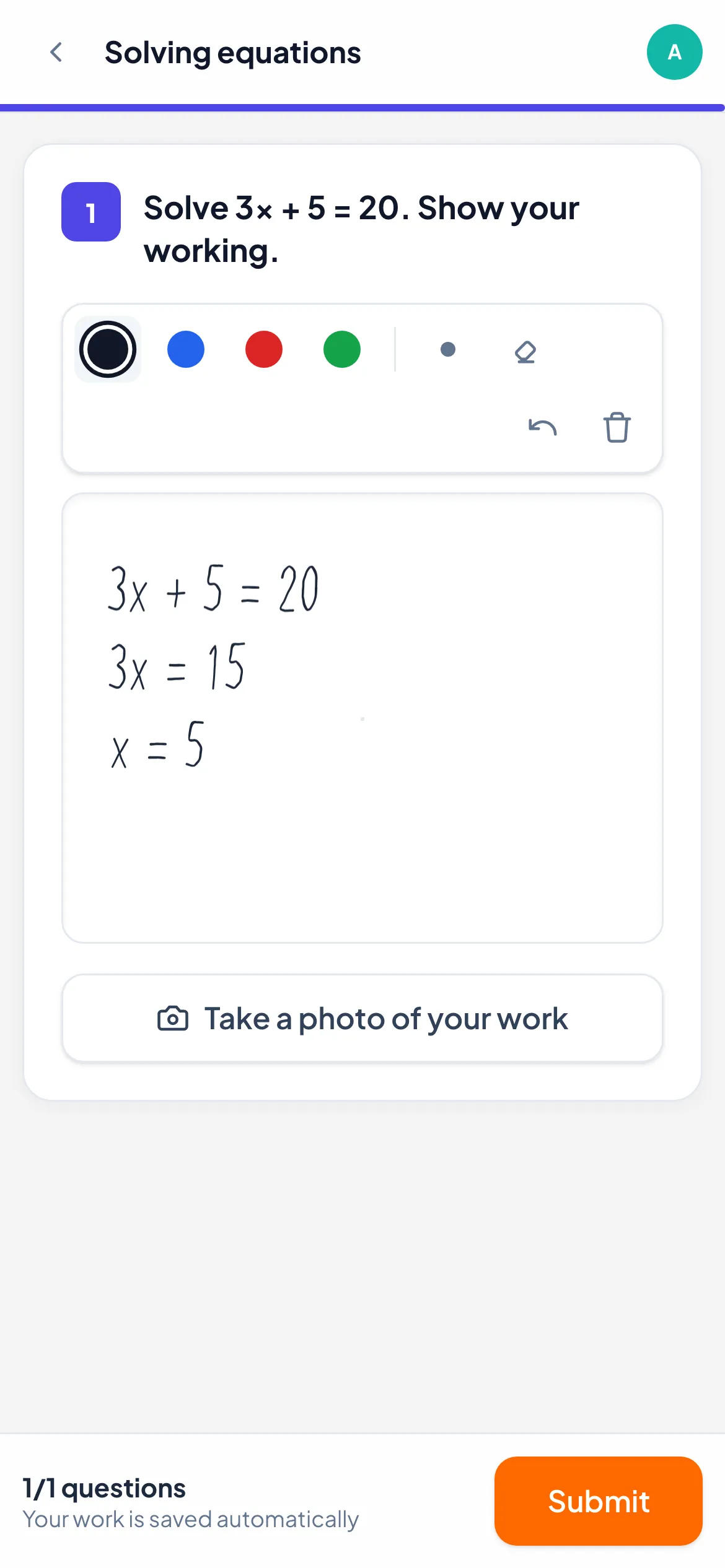
You see the method, not only the final line, so you can tell the student who subtracted 5 from the one who divided by 3 first. When: middle.
13. Label the picture
Add a picture to draw on: a diagram of the heart or a sentence. Students label the parts or mark the stressed syllable. When: middle or end.
14. Sketch the graph
“Sketch y = x² − 4 and mark where it crosses the axes.” A sketch tells you about shape and intercepts in one go, something a typed answer can’t do. When: end.
15. Place it on a line
Put a number line in the picture and ask students to mark ¾ or −1.5. Wrong placements show size misconceptions quickly. When: start.
Speak: answers you need to hear
16. Read it aloud
With an Audio question, students record a short passage. You listen for pronunciation and fluency without asking each student to speak in front of the group. When: middle, or homework for ESL students.
17. Explain your method
Ask for a 30-second recording: “Explain how you solved question 3.” Students who copied a method without understanding it usually struggle to explain it. When: end.
18. Practise a speaking task
Set an exam-style prompt (“Describe a place you like to visit”) as homework. You listen and reply with a voice note. When: homework.
Sort, match and order
19. Sort into groups
A Categorise question asks students to drag items into groups: physical or chemical change, or nouns and verbs. When: start or middle.
20. Match terms to meanings
Five words, five definitions, in a Matching question. It is quick to set and a clear check of vocabulary before you use it. When: start.
21. Put events in order
Use Put in order for the stages of mitosis or the steps of a method. When: middle.
22. Unscramble a worked solution
Give the lines of a worked solution in a random order. Students who can put them back in order understand why each step follows the last. When: end.
Paper, files and other evidence
23. Photo of paper working
Some work belongs on paper. Students scan a QR code on their screen and photograph the page with their phone. The photo lands on the question you asked. When: middle or homework.
24. Hand in a draft
A File upload question collects an essay plan or a lab write-up. Read one paragraph, not the whole thing, and reply with one next step. When: homework.
25. Watch who uses the hint
Add a hint to a harder question. Students open it themselves, and you see who used it. A student who gets it right after the hint is not in the same place as one who didn’t need it. When: any time.
What you see while they answer
Each example above maps to a question type in LearnWorkly, and you can browse all of them on the question types page. In the live view, a grid of students and questions fills in as they work. Questions with an answer key are marked as they arrive, drawings update stroke by stroke, and empty cells show who hasn’t started. Insights shows the Common wrong answer for many question types, which is often the misconception to address next.
You choose the pace. Student-paced lets everyone work through the activity, and One by one moves the whole group through the questions together. That suits hinge questions, because nobody sees the next question before you have looked at the answers. If you share your screen to discuss a mistake, turn on Hide names first. You can run the activity next to a video lesson, so students answer on their own screen while they still see and hear you.
For setup details of each type (such as accepted answers and margins), see the help article on question types and when to use them.
Building a lesson from formative assessment examples
You don’t need all 25. A 45-minute online lesson might use four:
- Start: three-question recall (6) and a matching task (20).
- Middle: a hinge question (1), then show your working (12) for the students who chose a wrong answer.
- End: one sentence in your own words (10).
Then set one speaking or paper task as homework. Next week, swap two examples for new ones. After a month you will know which formative assessment ideas give you the clearest evidence for your subject, and which ones your students take seriously.