Interactive questions
Scale: rate several statements on a live slider
Rate agreement with statements on a scale.
Opens a demo in the app. No sign-up needed.
What is Scale?
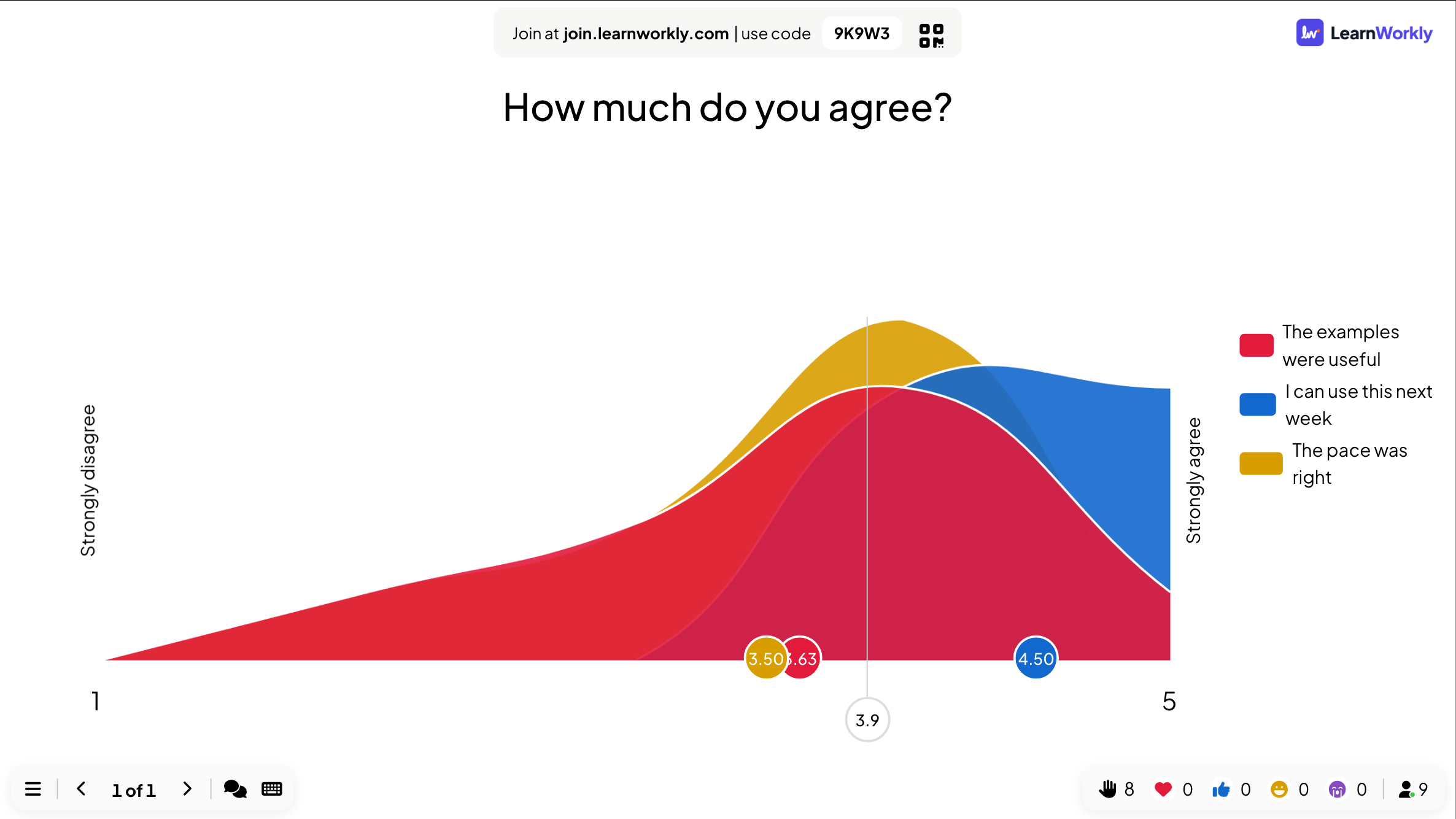
A Scale slide asks people to rate one or more statements on a range you define, for example from 1 for Strongly disagree to 5 for Strongly agree. Each statement gets its own slider on the phone, so you can compare several ideas or skills in one go. The big screen shows how the answers are spread for each statement and where the average sits, which makes it easy to see where the group agrees and where opinions are split. It works well for confidence checks, feedback and comparing options.
Read the full guide to ScaleOn the big screen
For each statement, a coloured spread of the answers across your scale, a dot marking its average, and an overall average line across the whole slide. No names appear, only spreads and averages.
On phones
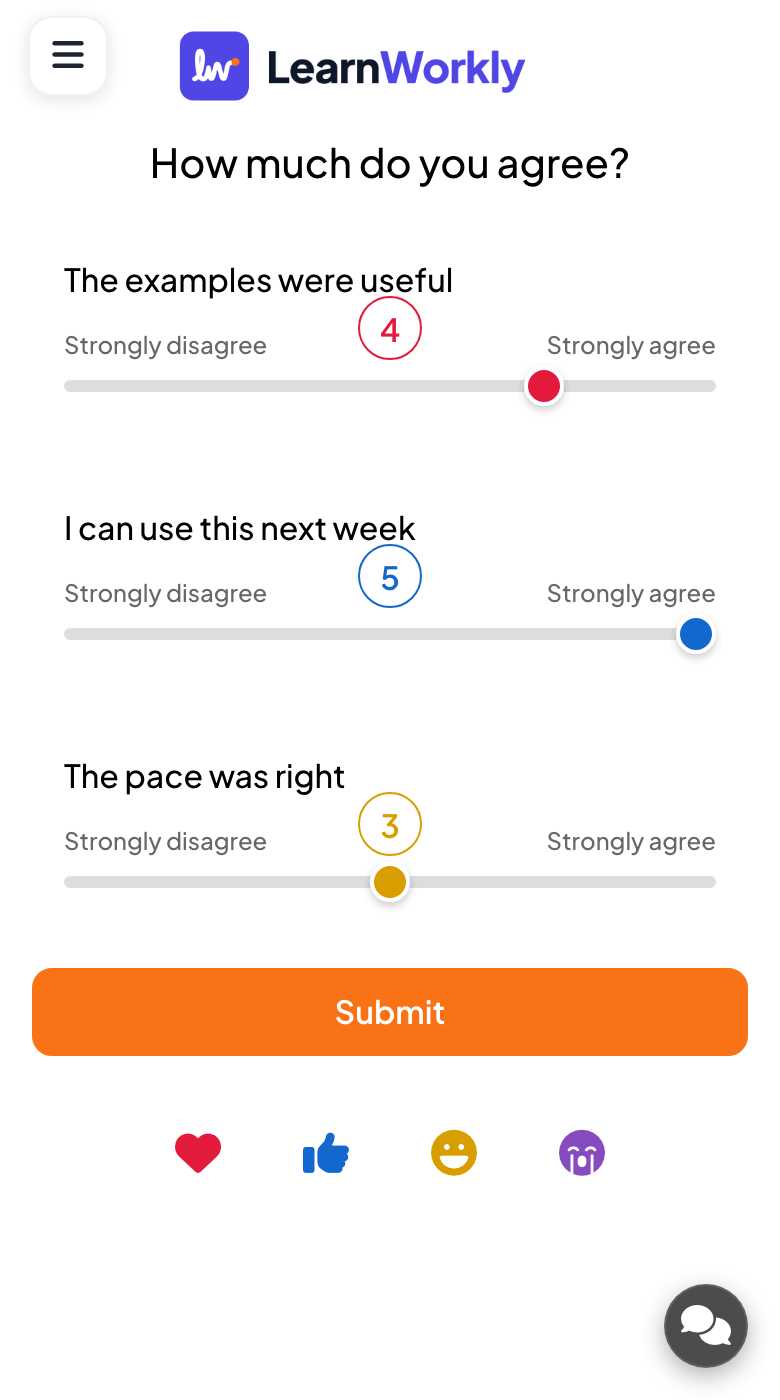
Each statement has a slider with your labels at both ends and the chosen number above the handle. Participants move every slider to their rating and press Submit. Sliders start in the middle of the scale.
What you control
Add up to 9 statements, each with its own colour. Set the bottom and top of the scale: labels default to Strongly disagree and Strongly agree, with a number at each end such as 1 and 5. Hide result, Stop Submission and time limit are available.
Great for
Confidence checks
Ask students how sure they feel about each topic before an exam and spend revision time where averages are lowest.
School teachersCourse feedback
Rate the pace, the materials and the exercises of a training day in one slide instead of a long form.
Trainers and L&D teamsTeam health checks
Rate statements about workload, clarity and support in a meeting and talk about the ones with the widest spread.
Meetings and presentationsOnline lessons
Remote learners rate their understanding of each step, and you see the whole group's picture without asking one by one.
Interactive lessonsStatements to rate
Copy one into a Scale slide, or use them as a starting point for your own.
Play it live- 1
I can explain photosynthesis in my own words.
- 2
The goals for this quarter are clear to me.
- 3
Today's session was the right pace for me.
- 4
I would recommend this event to a colleague.
- 5
I feel ready to use the new tool on my own.
Run it in three steps
- 1
In the editor, click + New Slide and pick Scale. Change the sample content to your own.
- 2
Click Present. People join on their phones with the code or QR code on the screen.
- 3
Answers appear on the big screen as people send them, and stay in the report afterwards.
Scale: frequently asked questions
Can I use a 1 to 10 scale instead of 1 to 5?
Yes. Set the numbers at the bottom and top of the scale to any range you want, such as 1 and 10 or 0 and 10, and change the labels at each end to match your question.
Is the scale question anonymous?
On the big screen, yes. The chart only shows how answers are spread and the averages for each statement and for the whole slide, never which participant chose which value.
What happens if someone does not move a slider?
Every slider starts in the middle of the scale, and an untouched slider sends that middle value when the person submits. Ask people to set every slider before pressing Submit so the averages are accurate.
How many statements can one slide hold?
Up to 9. Each statement gets its own colour and its own slider on the phone, so several related statements can be rated together and compared side by side on the result chart.
More activities like this
All activities
See it in your next session
Free for up to 10 live participants. No credit card, nothing for your audience to install.
Free for up to 10 participants · No credit card