Quiz
Match Pair: a matching quiz for anything that comes in pairs
Match pairs of items between two columns.
Opens a demo in the app. No sign-up needed.
What is Match Pair?
Match Pair is a quiz question where players connect each item with its partner. You write up to six pairs, such as words and translations, terms and definitions, countries and capitals or formulas and their names. Both sides of a pair can be a picture instead of text. On their phone, players go through the items one by one and choose the matching pair from a list, then submit. It is a compact way to check a whole set of vocabulary or concepts in a single question.
Read the full guide to Match PairOn the big screen
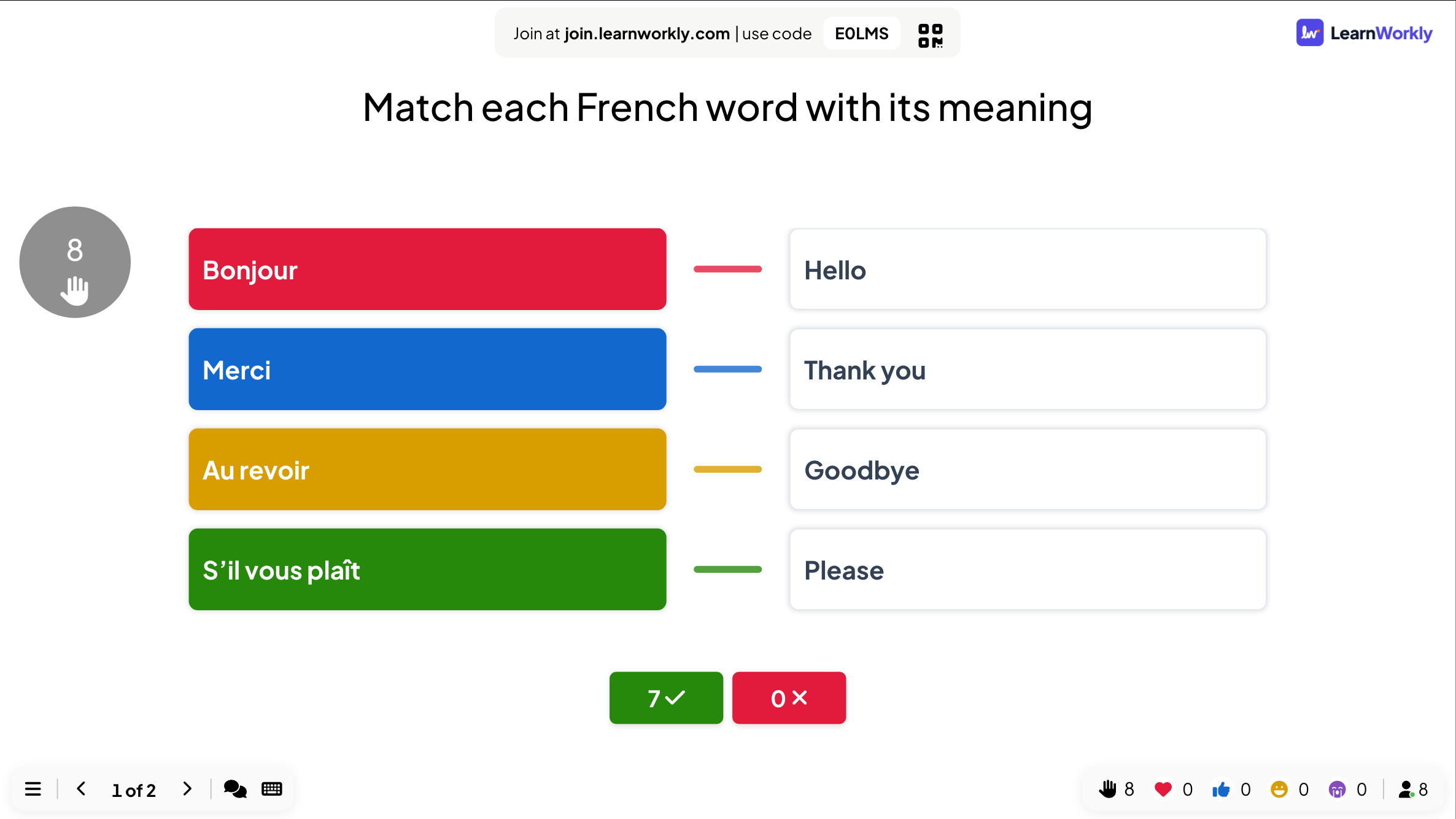
While players work, the big screen shows the question and the timer. At the reveal it draws a line between each item and its correct pair and shows how many players matched every pair right.
On phones
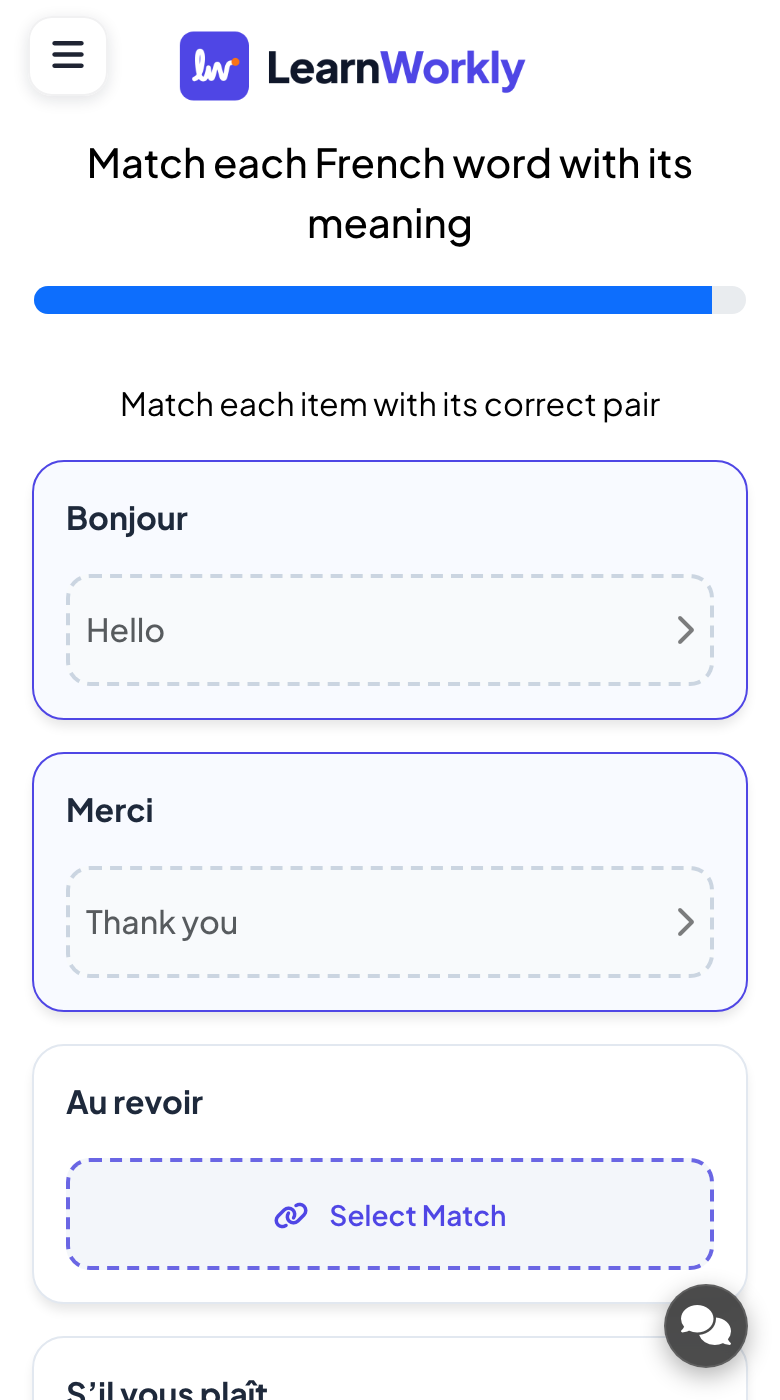
Phones list the items with a Select Match button under each one. Players tap it, choose the pair from the list, and repeat for every item. When all items are matched they tap Submit Answer.
What you control
You fill in up to six pairs, add pictures to either side if you like, and set the time and points. Matching takes longer than a single tap: around 45 seconds suits four pairs.
Great for
Vocabulary practice
Match words with their translations or meanings at the end of a language lesson.
ESL and language teachersTerms and definitions
Check that students link key terms to the right definition before a test.
School teachersRoles and responsibilities
Ask new staff to match tools, teams or contacts with what they handle.
Trainers and L&D teamsPicture matching rounds
Pair flags with countries or logos with sectors for a visual round at an event.
Events and team buildingPairs to try
Copy one into a Match Pair slide, or use them as a starting point for your own.
Play it live- 1
Match each French word with its meaning: bonjour (hello), merci (thank you), au revoir (goodbye), s’il vous plaît (please)
- 2
Match the country with its capital: Canada (Ottawa), Brazil (Brasília), Kenya (Nairobi), Japan (Tokyo)
- 3
Match the formula with the substance: H2O (water), NaCl (salt), CO2 (carbon dioxide), O2 (oxygen)
- 4
Match the author with the novel: Orwell (1984), Austen (Emma), Tolkien (The Hobbit), Shelley (Frankenstein)
- 5
Match the shortcut with the action: Ctrl+Z (undo), Ctrl+S (save), Ctrl+F (find), Ctrl+P (print)
Run it in three steps
- 1
In the editor, click + New Slide and pick Match Pair. Change the sample content to your own.
- 2
Click Present. People join on their phones with the code or QR code on the screen.
- 3
Fast, correct answers score points, and the leaderboard shows the top players after each question.
Match Pair: frequently asked questions
Is there partial credit if some pairs are right?
No. A Match Pair answer counts as right only when every item is linked to its correct pair. Keep the number of pairs small if you want more players to score.
Can two items share the same pair?
No. Each pair is used once, so write pairs that cannot be confused with each other. If two items could have the same answer, rephrase one of them.
Can I use pictures instead of words?
Yes. Both the item and its pair can have an image, so you can match flags to countries, pictures to words or diagrams to labels.
How many pairs can one question have?
Up to six. Four pairs with about 45 seconds is a comfortable start; add time if you use all six or if the pairs need reading.
More activities like this
All activities
See it in your next session
Free for up to 10 live participants. No credit card, nothing for your audience to install.
Free for up to 10 participants · No credit card