Quiz
True or False: settle facts and myths with the whole room
Players pick a side, then the answer is stamped on screen with the reason why.
Opens a demo in the app. No sign-up needed.
What is True or False?
True or False is a quiz question built around a single statement. Each player decides whether it holds or not, with one tap on their phone. It is the quickest quiz slide to write and a natural fit for myth-busting, because at the reveal the right side is stamped on the big screen next to your short explanation and its source. You can relabel the two sides as Fact or Myth, Real or Fake, or Yes or No, so the same slide works for science myths, fake news checks or simple yes and no questions.
Read the full guide to True or FalseOn the big screen
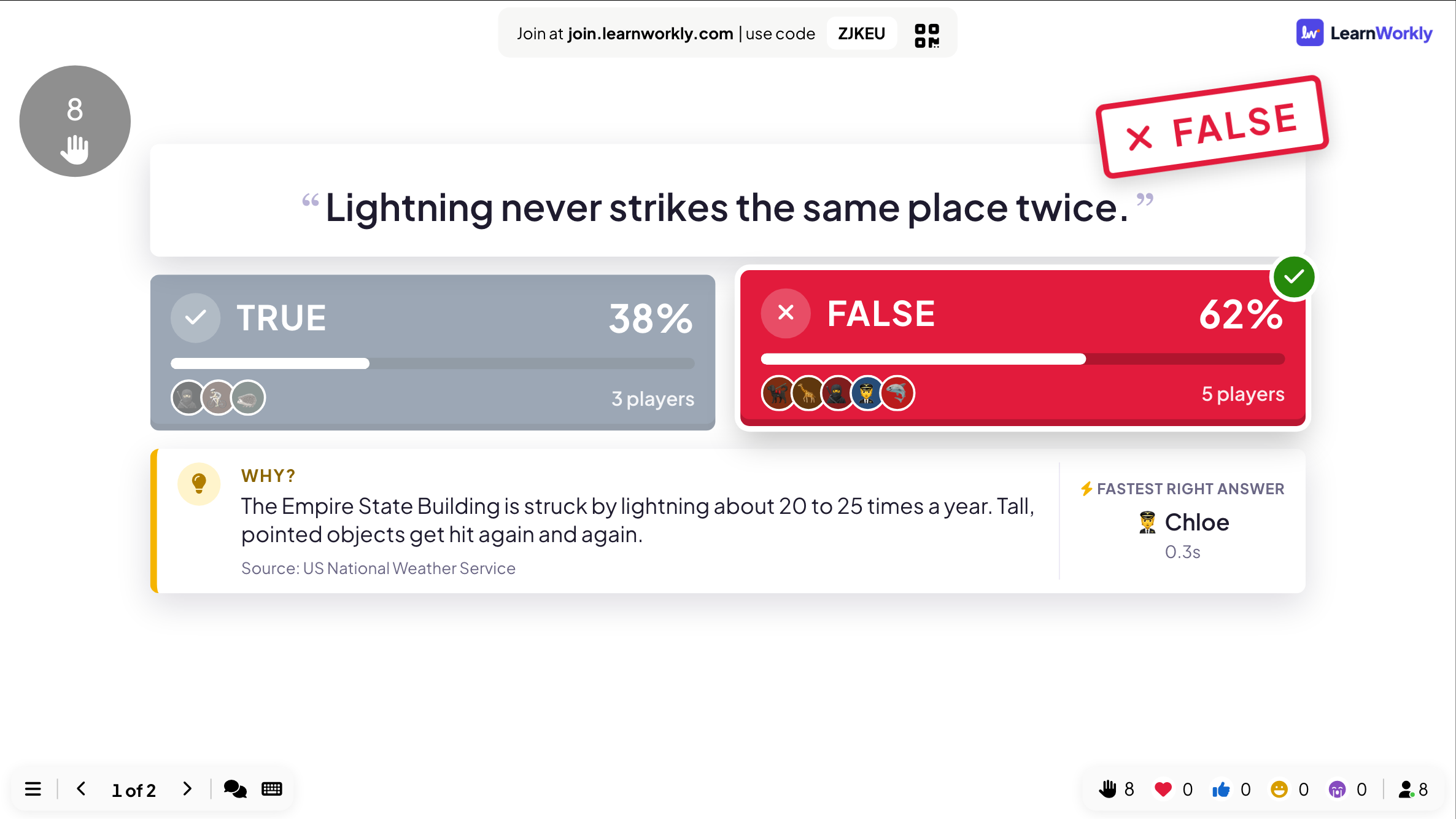
After the countdown the big screen stamps the right side on the statement. It shows how the room split, in percentages and player counts, who gave the fastest right answer, and the reason you wrote, with its source underneath.
On phones
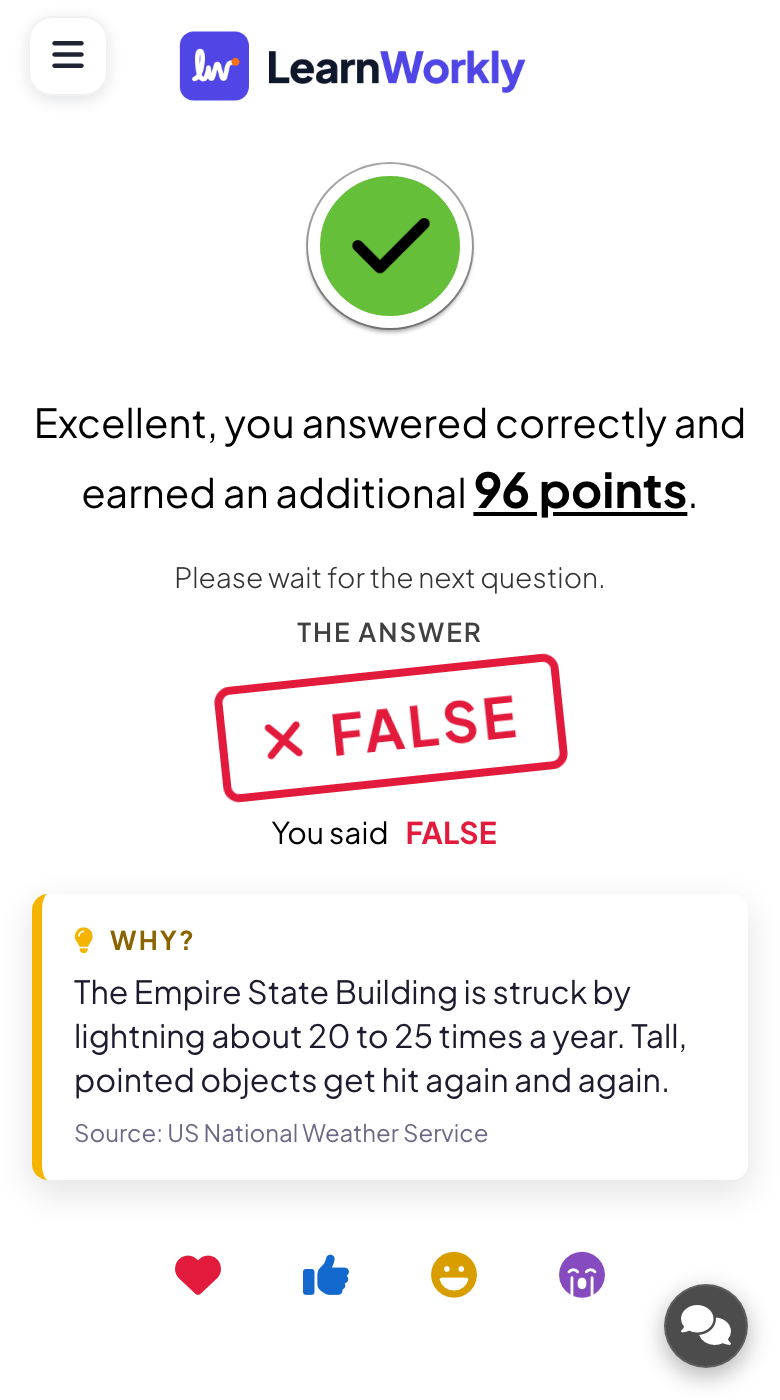
Each phone shows two big buttons with your chosen labels, and one tap sends the choice. After the reveal, players see whether they were right, the points they earned, what they picked, the correct answer and your explanation.
What you control
You choose one of four label pairs, pick the right side and write an explanation of up to 400 characters plus a source. Time and points work as in Select Answer, with more points for fast right answers on by default.
Great for
Science myth-busting
Test common misconceptions in class and use the explanation at the reveal to correct them on the spot.
School teachersSafety and compliance
Check staff on rules that are often misremembered, then show the policy source with the answer.
Trainers and L&D teamsFact or Myth rounds
Run a fast round of surprising statements at a fun day or quiz night to warm up the room.
Events and team buildingReal or Fake headlines
Show headlines in an online session and let people judge which ones are real before you explain.
Meetings and presentationsStatements to try
Copy one into a True or False slide, or use them as a starting point for your own.
Play it live- 1
True or false: sound travels faster in water than in air (true)
- 2
Fact or myth: goldfish have a three-second memory (myth)
- 3
True or false: lightning never strikes the same place twice (false)
- 4
True or false: a strong password should be reused across work accounts (false)
- 5
Fact or myth: Mount Everest is the tallest mountain on Earth measured from base to peak (myth, Mauna Kea is taller from its base)
Run it in three steps
- 1
In the editor, click + New Slide and pick True or False. Change the sample content to your own.
- 2
Click Present. People join on their phones with the code or QR code on the screen.
- 3
Fast, correct answers score points, and the leaderboard shows the top players after each question.
True or False: frequently asked questions
Can I use other labels than True and False?
You can choose from four pairs: True / False, Fact / Myth, Real / Fake and Yes / No. Your own wording is not possible. For other two-way choices, a Select Answer slide with two options does the job.
Why are the two buttons blue and red?
The colours only mark the two sides: True on one, False on the other. Whether a player was right appears on their phone and on the big screen once the time is up.
Is the explanation required?
No, it is optional, but it turns the reveal into a teaching moment. Without it the big screen only shows the stamp and how the room split. With it, players also read the reason on their phones.
Do fast answers score more in True or False?
Yes, by default. The speed setting, the answer time and the point range work exactly as in a multiple-choice question. Set both point limits to 0 if you want the round to count for nothing.
More activities like this
All activities
See it in your next session
Free for up to 10 live participants. No credit card, nothing for your audience to install.
Free for up to 10 participants · No credit card