Knowledge check questions: 50 examples for training
Knowledge check questions for workplace training: six formats that test real understanding, plus 50 examples from safety to software and leadership.
LearnWorkly team7 min read

Knowledge check questions are the short questions you ask during or straight after a training session to see whether people can use what you just taught. Most trainers already ask a few, but many test memory of a slide (“What does PPE stand for?”) rather than the decision someone will face on Monday morning. This post shows six formats that test understanding, then gives 50 examples you can adapt, grouped by topic.
Why knowledge checks are worth the five minutes
A knowledge check does two jobs. It tells you what the room has understood, so you can revisit the part that didn’t land. And it helps people remember. In a well-known study, Roediger and Karpicke found that students who took recall tests on a text remembered much more a week later than students who spent the same time rereading it, even though the rereaders felt more confident.
There is also a reporting reason. Kirkpatrick Partners describe Level 2 of their model as measuring the degree to which participants acquire the intended knowledge and skills. A feedback form tells you whether people enjoyed the day; a knowledge check tells you whether they learned anything. Full post-training quizzes and before-and-after testing are topics for another post.
Six formats for knowledge check questions
1. Scenario. Describe a situation and ask what the person should do. It is the closest thing to the real job. Keep it short, and make every wrong option something a real employee might do.
2. Put in order. List the steps of a procedure in a shuffled order. Ordering questions catch people who know the steps but not the sequence, which is often where accidents and complaints come from.
3. Spot the error. Show a short email, form or process with one mistake and ask people to find it. It works well for policy, writing standards and software settings.
4. Categorise. Give a list of items and two to four groups, such as “personal data or not?”. Sorting forces a decision on every item, so guessing is easy to see.
5. True or false, with a reason. Plain true/false is quick but rewards guessing. Add a follow-up short answer: “Why?” One line of reasoning shows you who really knows.
6. Short answer. Ask for a word, a number or one sentence. Short answers are harder to guess than multiple choice and still quick to mark.
A good rule for all six: if someone could answer by matching a word from your slides, rewrite the question so they have to apply it.
50 knowledge check examples by topic
These knowledge check examples show their format in brackets. Swap in your own policies, numbers and system names first.
Health and safety
- A colleague is on a chair to reach a high shelf. What do you do first? (scenario)
- Raise the alarm, leave by the nearest exit, go to the assembly point, report to the fire warden. (put in order)
- Hazard or risk? Wet floor; chance of slipping; trailing cable; chance of tripping. (categorise)
- You should lift with a bent back if the box is light. (true or false + why)
- Where is the nearest first aid kit to your desk? (short answer)
- An accident report that gives no time or location. (spot the error)
- You see smoke coming from a plug socket. Name your first two actions. (scenario)
- Report to the safety lead or fix yourself? Loose carpet tile; missing fire extinguisher; empty paper towel dispenser. (categorise)
- Who is the fire warden on your floor? (short answer)
Customer service
- A customer is angry about a late delivery and starts shouting. What do you say first? (scenario)
- Listen, acknowledge, apologise, offer a solution, confirm next steps. (put in order)
- A reply email that promises a refund “today” when policy says five working days. (spot the error)
- You should always offer a discount to calm a complaint. (true or false + why)
- Open or closed question? “Can I have your order number?” “What happened when you tried to log in?” (categorise)
- Within how many hours must a complaint receive a first reply? (short answer)
- A caller asks for a colleague’s personal mobile number. How do you respond? (scenario)
- A chat reply full of internal jargon the customer won’t know. (spot the error)
- Rewrite “That’s not my department” as a helpful sentence. (short answer)
Data protection basics
- Personal data or not? A client’s email address; a company’s registered address; a staff ID number; this week’s sales total. (categorise)
- You emailed a spreadsheet of client details to the wrong person. What do you do in the next hour? (scenario)
- Deleting a file you sent by mistake means it doesn’t need reporting. (true or false + why)
- A sign-up form that asks for date of birth with no reason given. (spot the error)
- Who in the company do you report a suspected data breach to? (short answer)
- A stranger in a hi-vis vest asks you to hold the door to the server room. What do you do? (scenario)
- Safe to share or not? Your password with IT; your password with your manager; a one-time code with someone who phoned you. (categorise)
- Notice, contain, report internally, record what happened. (put in order)
Onboarding and company policy
- How do you book annual leave? (short answer)
- You are unwell on a workday. Who do you tell, and by what time? (scenario)
- Expenses can be claimed without a receipt if they are under the limit. (true or false + why)
- Allowed or not on a work laptop? Installing a browser extension; using a personal cloud drive; joining guest Wi-Fi in a café. (categorise)
- A travel claim that books first class against policy. (spot the error)
- Name the three company values in your own words. (short answer)
- A supplier sends you an expensive gift. What does the gifts policy say you do? (scenario)
- The steps of your first-week IT setup. (put in order)
Software training
- Open the record, edit the field, save, check the audit log. (put in order)
- Which menu holds the export to Excel option? (short answer)
- A screenshot of a report filtered to the wrong date range. (spot the error)
- A colleague can’t see a shared file. What two things do you check? (scenario)
- Which role can do what? Approve invoices; create invoices; view reports. (categorise)
- Closing the browser tab saves your draft automatically. (true or false + why)
- What keyboard shortcut undoes the last change? (short answer)
- You see an error message you don’t recognise. Where do you look before raising a ticket? (scenario)
Leadership and management
- A team member has missed three deadlines this month. How do you open the conversation? (scenario)
- Feedback that describes behaviour or judges the person? “You interrupted twice in the meeting.” “You’re not a team player.” (categorise)
- The steps of your one-to-one meeting template. (put in order)
- Delegating a task means you are no longer accountable for it. (true or false + why)
- A goal written as “Improve customer satisfaction” with no measure or date. (spot the error)
- Rewrite that goal so it is specific and measurable. (short answer)
- Two team members disagree in front of a client. What do you do afterwards? (scenario)
- Name one thing you will change in your next team meeting after today’s session. (short answer)
Running knowledge check activities in a session
You can ask these aloud, on paper or on screen. Aloud is quick, but you only hear from the confident people. On screen, everyone answers and you see the spread at once, which is what makes knowledge check activities useful.
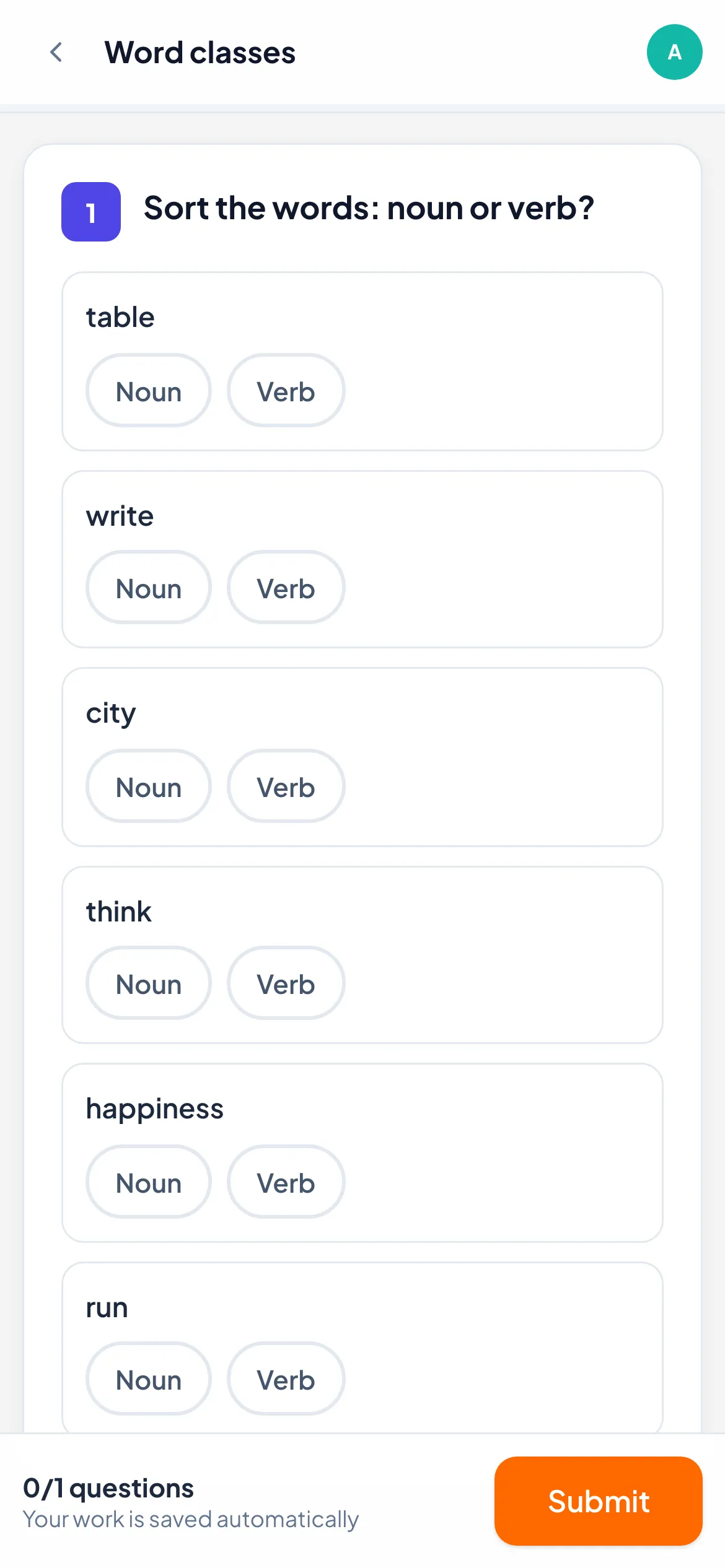
The screenshot above is a Categorize question as a participant sees it on a phone. The example comes from a language lesson, but “personal data or not” looks the same: each item has a button for every group, and work saves automatically. Categorize, Put in order, True / False and Short answer are all marked for you, with partial credit on sorting and ordering.
The LearnWorkly page for trainers shows how a workshop runs: participants scan a code or open a link and type their name, with no account. Answers appear live, so if half the room puts “staff ID number” in the wrong group, you spend two minutes on it. You can set a pass mark for a certificate and export scores as CSV or Excel for the client.
If writing questions sounds like an evening’s work, the AI question generator can draft knowledge check questions from a topic or your own handout, and you edit each one before the session. Our post on what an AI quiz generator is good at, and where it fails has a short checklist for that review.
Before you reuse these examples
Pick five, not fifty. Two or three questions after each block of training show you what landed. Rewrite each one with your organisation’s names, systems and numbers, because a generic question gets a generic answer. Then ask a colleague to answer them cold. If they get one right without attending, it tests common sense rather than your training.