AI quiz generator for teachers: what it’s good at (and not)
An AI quiz generator for teachers saves real time on drafts, but not on judgement. What it does well, where it fails, and a 10-minute workflow to check it.
LearnWorkly team5 min read
An AI quiz generator for teachers can turn a topic or a worksheet into twenty questions in less time than it takes to make a cup of tea. That is genuinely useful. It is also where many teachers stop thinking, and that is where the problems start: a plausible distractor that is actually correct, a question pitched two years above the class, or a “fact” nobody can find in the textbook.
This guide is an honest look at what AI quiz generators are good at, where they fail, and a simple workflow that keeps the time saving without handing over your judgement.
What an AI quiz generator actually does
Most tools work the same way. You describe what you want (topic, level, number and type of questions) or upload material you already use, such as a worksheet or a text. A large language model drafts questions, answer keys and sometimes hints and explanations. You then edit the draft and give it to students.
The important word is draft. The model predicts plausible text; it does not know your class, your scheme of work or what your students got wrong last week. The government’s position on generative AI in education makes the same point for schools in England: AI can reduce workload, but teachers remain responsible for checking the output and for the quality of what reaches students.
What it is genuinely good at
- Volume of practice. Ten variations of the same skill, with different numbers or contexts, are tedious to write and easy for AI to draft.
- Turning existing material into questions. A reading passage, a worksheet or your own notes become comprehension questions, vocabulary matching or a gap fill in seconds.
- First drafts of distractors. Wrong options for multiple-choice questions are the hardest part to write. AI often produces reasonable ones that you can sharpen.
- Hints and explanations. A short hint for students who are stuck, and an explanation shown after they answer, are a lot of writing per question. AI drafts both.
- Changing the level. “Make these easier for Year 7” or “add two harder questions for the top group” takes one request instead of a rewrite.
- Other languages. For language teachers, or classes with students who are new to English, drafts in the target language save a lot of time.
Where it fails (and how to spot it)
- Wrong answer keys. The most dangerous failure. In maths and science especially, check every answer yourself. A student marked wrong for a correct answer loses trust quickly.
- Distractors that are also correct. “Which of these is a renewable energy source?” with two defensible answers. Read every option, not just the correct one.
- The wrong level or curriculum. A question on a topic your students have not met, or using terms your exam board does not use. Check against your scheme of work.
- Invented facts and sources. Dates, quotations and statistics can be made up with total confidence. Remove anything you cannot verify.
- Testing recall only. Left alone, AI tends to write “what is” questions. Ask explicitly for questions that require explaining, applying or spotting a mistake.
- Repetition. Twenty questions can turn out to be five ideas, each asked four ways. Delete duplicates and ask for what is missing.
A 10-minute workflow that keeps you in charge
- Start from your material. Upload the worksheet or text you already planned to use, or describe the exact lesson objective. The closer the input to your lesson, the better the output.
- Ask for mixed question types. For example: three multiple-choice questions, two short answers, one “explain why” question and one question where students find a mistake.
- Check every answer key first. Before you read anything else, check that each correct answer is correct and each wrong option is wrong.
- Cut and edit. Delete weak questions, fix the wording to match how you teach, and replace anything off-curriculum. Most teachers keep about two-thirds of a draft.
- Add one question of your own. Usually the hinge question that targets the misconception you expect from this class. AI does not know it; you do.
- Tag skills. If your tool lets you tag each question with a skill, do it now. It turns quiz scores into progress by topic later.
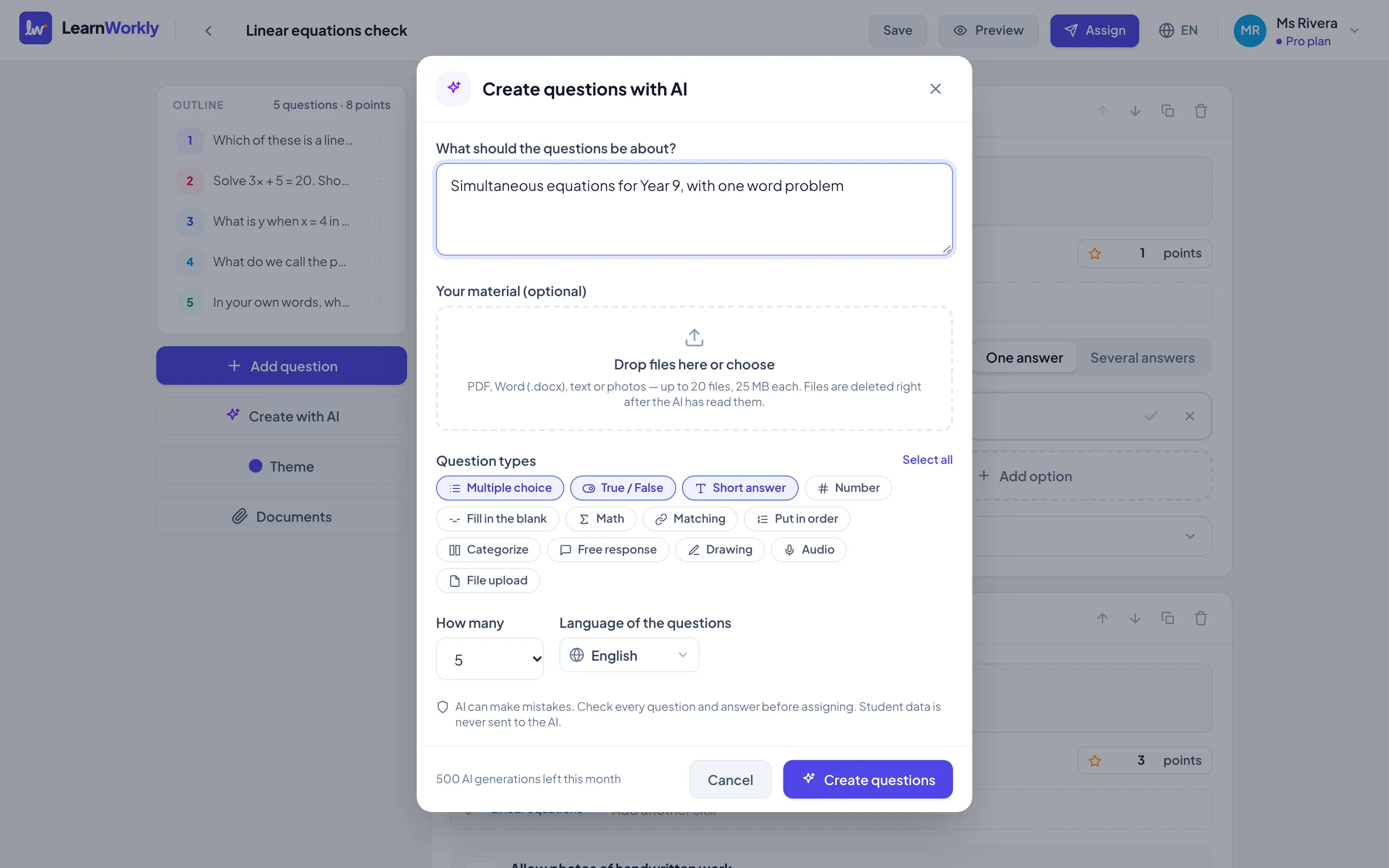
In LearnWorkly, the AI question generator follows this pattern: describe the topic or upload a worksheet as a PDF or photo, choose the question types, and every generated question stays fully editable before you assign it. The help article on the AI question generator walks through each option.
What about student data?
A quiz generator should never need student data. Writing questions requires your topic or your material, not names, emails or answers. Before you use any AI tool, check:
- What is sent to the AI provider. Only your prompt and your uploaded material should leave the tool.
- Whether it is stored or used for training. Look for a clear statement in the privacy policy, and prefer tools that turn storage off for these requests.
- What happens to uploaded files. A worksheet you upload does not need to be kept once the questions are drafted.
LearnWorkly sends only your prompt or worksheet to the AI provider, never student names, emails or answers; requests are made with storage turned off, and uploaded worksheets are deleted straight after.
Good prompts make better drafts
A vague prompt gets a generic quiz. A specific one gets something you can use:
- Weak: “Quiz on photosynthesis.”
- Better: “Eight questions on photosynthesis for Year 9, foundation level: three multiple choice with one common misconception as a distractor each, three short answers, one question to complete the word equation, and one ‘explain why plants grow faster in a greenhouse’. UK spelling.”
Include the year group, the exam board or curriculum if relevant, the question types and the misconception you want to test. Ask for hints written for a student who is stuck, not for a teacher.
The bottom line
AI quiz generators are very good at the parts of quiz writing that take time and very poor at the parts that take judgement. Let them draft the volume, the variations, the distractors and the hints. Keep the answer keys, the level, the misconceptions and the final decision for yourself. Used that way, they free up time for the part of teaching AI cannot do: looking at what your students actually answered and deciding what to teach next.