A Mentimeter alternative for teachers: games and homework
A Mentimeter alternative for teachers who want more than polls: class games for revision, team quizzes, ten quiz formats and homework with a timer.
LearnWorkly team6 min read

Plenty of teachers first meet Mentimeter in a staff meeting or a university lecture, then try it with their own class. For a quick poll or a word cloud at the start of a lesson, it works. The gaps show up in week three, when the class asks for a game instead of another multiple-choice question. You need a homework quiz with a deadline. Thirty students join, and the free plan’s monthly allowance is gone after one lesson. This post is for anyone searching for a Mentimeter alternative for teachers. It covers six things LearnWorkly does in the classroom that Mentimeter does not offer.
Everything about Mentimeter here comes from its own plans page and help centre, checked in November 2026. Both tools have polls, word clouds, open questions, Q&A and a quiz leaderboard, so those are left out.
Why teachers look for a Mentimeter alternative
Mentimeter was built for presentations: one speaker, an audience, live answers on a screen. Using Mentimeter for teachers works best when the lesson looks like a talk, and most lessons do not. Students need to practise, compete, get it wrong safely, and then show what they know on their own. In short, you want one tool that follows the whole cycle of a unit, from the first starter on Monday to the end-of-unit test three weeks later, so the results all sit in one place. Use the six points below as a checklist, whichever tool you end up with.
1. Class games that revise the content
Mentimeter’s quiz competition has two types of question: Select Answer and Type Answer. LearnWorkly adds 17 live games, on every plan. Several of them carry your own questions, so the fun is also revision:
- Escape Room: teams solve your clues to open the doors. It makes a strong end-of-topic lesson, and our post on a digital escape room for revision shows one built for chemistry.
- Last One Standing: one wrong answer and you are out, until a single winner is left.
- Sort It: students drag cards into groups, such as ionic or covalent, noun or verb.
- Bingo with clues: the screen shows a definition, and students find the word on their card.
Other games, like Duck Race and Spinner Wheel, ask no questions at all. Use them to pick who answers next or who chooses the next activity. A class that chose the reader in a Duck Race argues far less about it.
2. Quiz formats that fit your subject
Beyond picking an option and typing an answer, LearnWorkly’s quiz slides cover the way each subject checks knowledge:
- Fill in the Blank for grammar in a language lesson, or the key line of a poem.
- Match Pair for vocabulary, keywords and definitions, or capitals and countries.
- Puzzle for timelines in history and method steps in science.
- Pin Answer to tap a place on a map, a part of a cell or an organ on a diagram.
- Estimate for maths and science, where the closest number wins.
- Vote, Discuss, Revote: students answer, discuss with a partner, then answer again.
The last one is built on peer instruction. When most of the class changes to the right answer after talking, you have learned something too: the explanation worked, and you can move on.
3. Team quizzes for a whole class
Mentimeter counts quiz points per device, so its help centre suggests one device per team. LearnWorkly has a team quiz mode built in. Students join on their own devices and pick a team in the lobby. Every student answers, and the leaderboard shows the team ranking first.
You can also run it the other way, with one tablet per table. That suits younger classes or a room with only a few devices. Team scoring can count the total, the average, or the fastest correct answer, so uneven teams stay fair.
4. Homework and tests with a timer and a pass mark
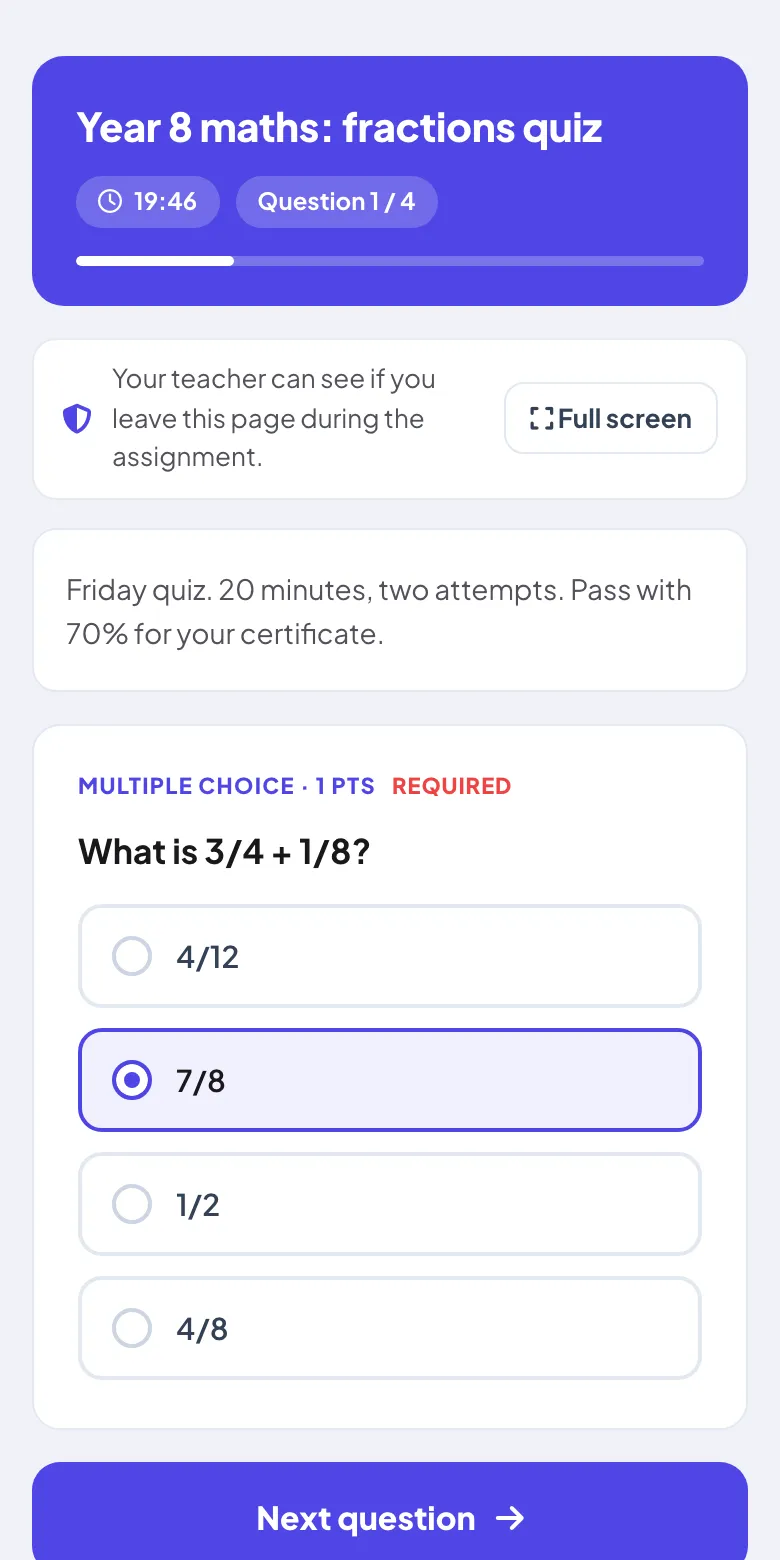
Mentimeter’s Survey mode lets people answer at their own pace, and its help centre says voting stays open with no time limit. A homework quiz or a class test needs rules. LearnWorkly’s homework and assignments give you:
- A due date, with late work accepted or refused, and an optional late penalty.
- 1, 2, 3 or 5 attempts, and a time limit in minutes.
- Shuffled questions and options, or a random set of questions for each student.
- A choice of when students see the answers: straight away, or after the due date.
- Tab-switch detection, which records when a student leaves the page. Students are always told it is on.
- A pass score, with a PDF certificate for students who reach it.
Questions are marked automatically, apart from essays and uploaded photos of working, which you mark in the Results view. The Insights tab lists the hardest questions first, with the most common wrong answer. Paste in your class list and you can see who has not submitted yet. That gives you the next lesson’s starter: the question most of the class got wrong.
The Education Endowment Foundation rates feedback among the most effective, low-cost ways to raise attainment. Results sorted by question make that feedback quicker to give.
5. Lessons from your own PowerPoint
Most teachers already have years of slides. Mentimeter’s import is on paid plans and turns each slide into a picture. LearnWorkly imports PowerPoint on every plan, and your slides stay editable, with their animations. Add a quiz question after the slide that explains a concept, and a game before the plenary. Our page for teachers walks through a complete lesson built this way.
6. A free plan that lasts all month
Mentimeter’s free plan counts 50 participants a month across all your presentations. With a class of 30, that is about a lesson and a half. LearnWorkly’s Free plan has no monthly allowance. Up to 10 students can join each session, as often as you like, with every game and slide type.
That covers tutoring, small groups and intervention sessions, and it even covers a whole class if students play in teams of three on ten shared devices. If every student in a class of 30 plays on their own device, you need the Basic plan, which takes 100 at once. It can be paid monthly or yearly.
Students join at join.learnworkly.com with a code or a QR code. They type a nickname: no account, no app and no email needed.
When Mentimeter is the better pick
If your school already has a Mentimeter licence and your students know it, keep using it for polls and word clouds. It is also a good fit for lecture halls, where the goal is a quick show of opinion from a very large group. For a feature-by-feature table, see the LearnWorkly and Mentimeter comparison. Trainers and event organisers will find their side in Mentimeter alternatives for training, meetings and events.
Try it with one unit
Pick the unit you are teaching next week, and rebuild just three moments of it:
- The starter: a Match Pair on last lesson’s keywords.
- The middle: a Vote, Discuss, Revote question on the idea students find hardest.
- The end: a Last One Standing round, then a short homework assignment with a 20-minute time limit.
After one week, compare what you learned about your class with a normal week. That tells you more than any comparison table.