Christmas escape room game for a class or a team
Build a Christmas escape room game for pupils or colleagues: a festive story, four to six locks, teams on their phones, hints and a quick debrief.
LearnWorkly team6 min read
A Christmas escape room game is the rare December activity that works the same way for a Year 6 class and the finance team. Teams are locked in Santa’s workshop, every door has a lock, and every lock is a question. Nobody needs a costume or a stack of printed envelopes. This guide shows how to write the story and the locks, then how to run it on one big screen with players on their phones, for a class or for a team.
How a digital Christmas escape room game works
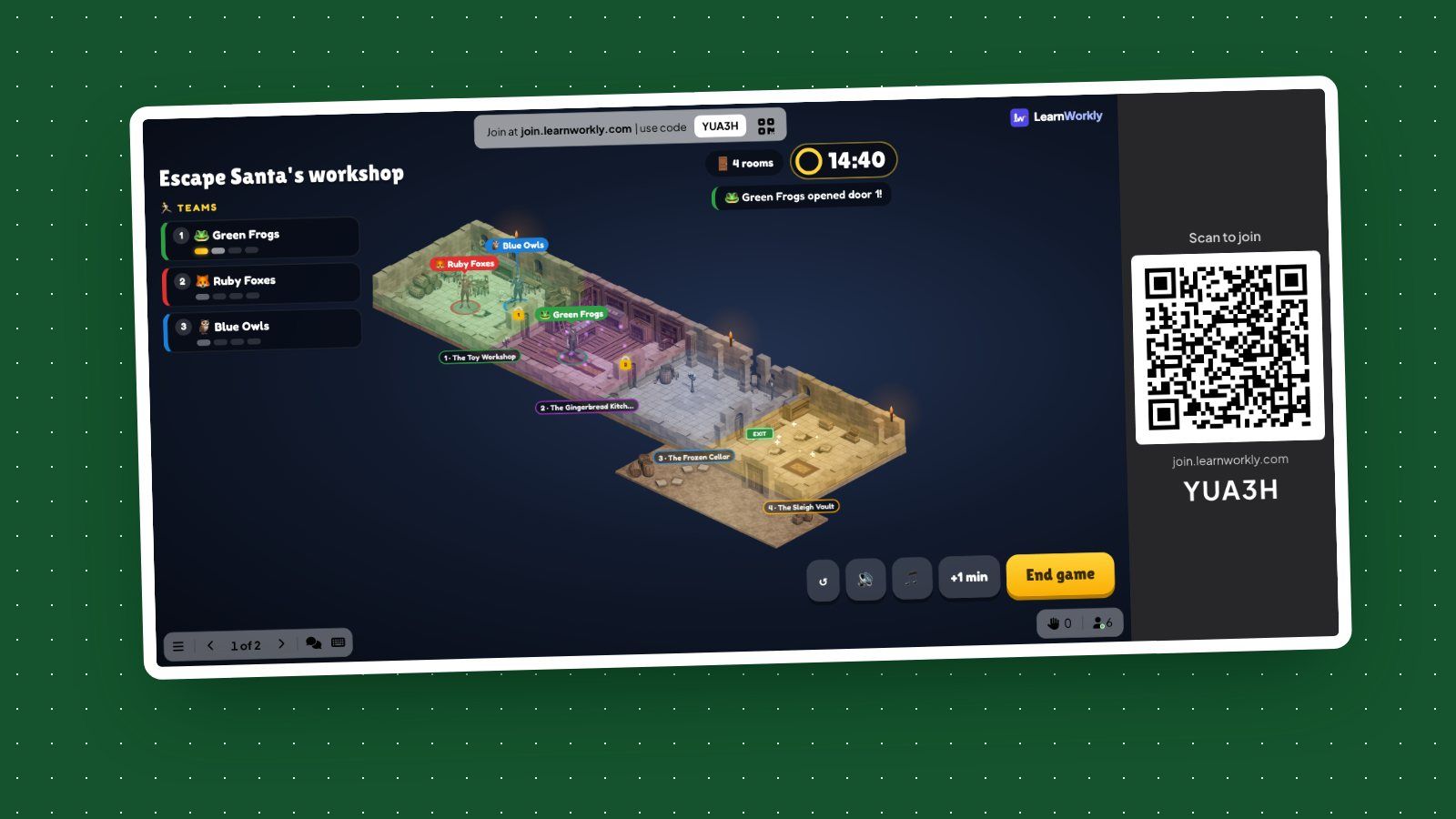
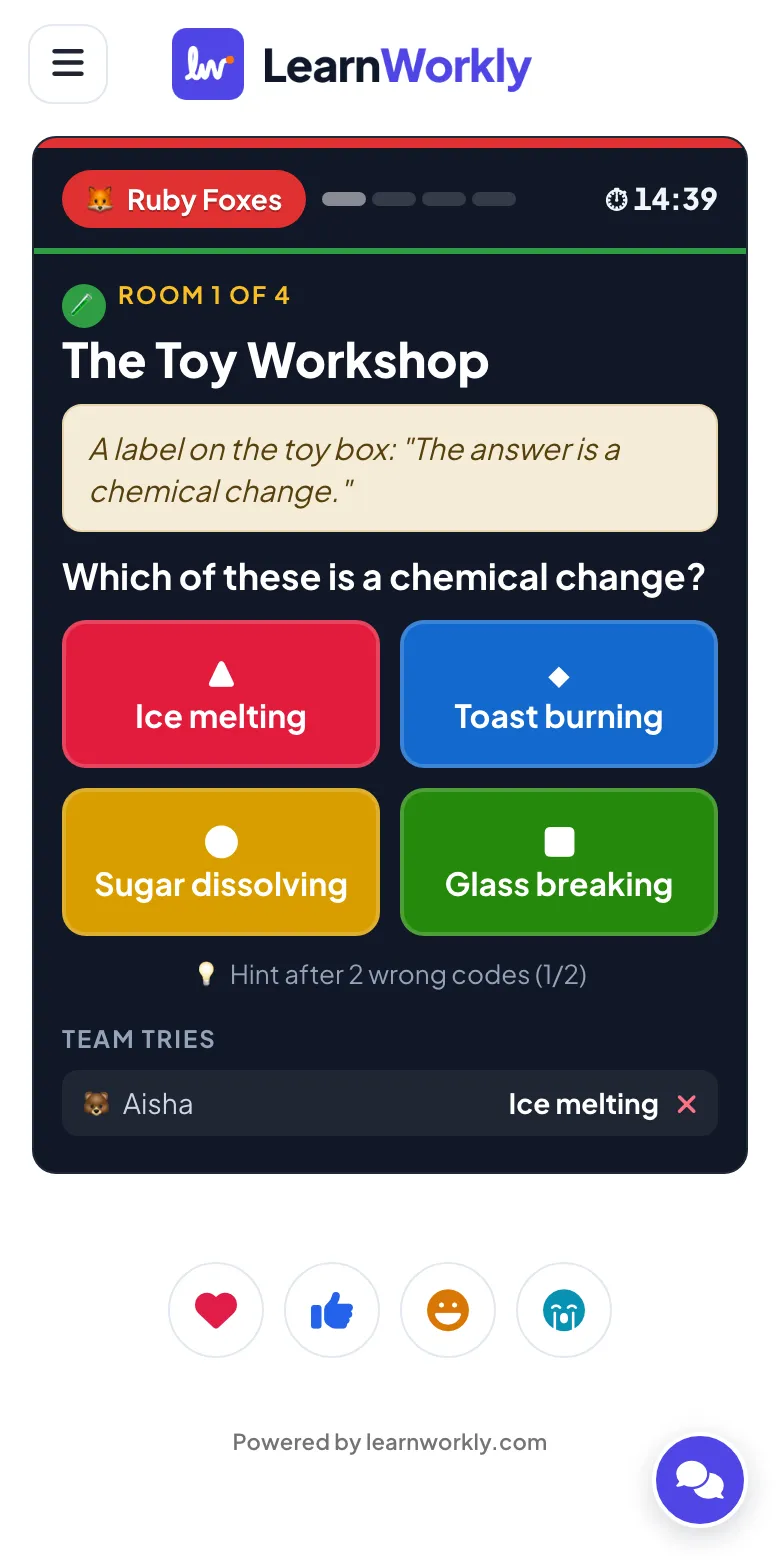
You put the game on the big screen. Players join at join.learnworkly.com with the code or the QR code, type a nickname and are split into teams as they arrive. Nobody needs an account. Each phone shows its team’s current room: a line of story above a question with a lock. Anyone in the team can try a code, so people have to talk to each other before they guess. A right code opens the door to the next room. The first team out of the last room wins, and when the time runs out, the team that got furthest wins.
The big screen shows a map of the rooms with each team’s position, the clock and news such as “Green Frogs opened door 1”. You can add a minute or end the game early. The codes stay on your side: phones never receive the answers, so a quick-thinking pupil can’t find them in the page.
Build your Christmas escape room in five steps
- Add an Escape Room slide to a presentation. It opens with a sample game so you can try it straight away. The Escape Room help page walks through every button.
- Write the story. Two sentences are enough: “The elves have locked the workshop doors and the sleigh leaves at midnight. Crack every lock to get out in time!” The story is the wrapping paper. Keep it short so people get to the first lock quickly.
- Add the rooms. You can have 2 to 8 rooms; four to six is the sweet spot for 15 minutes. Give each room a name and a question; a clue is optional.
- Choose a lock for each room. A Choice lock is a multiple-choice question. A Number code is a padlock with one wheel per digit. A Word lock takes typed answers, and you list every answer you accept. Capitals, accents and punctuation don’t matter.
- Write a hint for every room. After two wrong codes, a team can take the hint for 30 seconds on its time.
If you are short of time, Generate with AI writes a story and one lock per room from a topic and a level. Check every code and every accepted answer before you play. A wrong code in a lock you wrote yourself is annoying. In a lock you didn’t check, it ruins the game.
Christmas escape room ideas for the classroom
In a Christmas escape room game for a class, the locks should be the term’s work in festive wrapping. That is what makes it revision rather than a party game. A systematic review of escape rooms in education by Veldkamp and colleagues found that students often feel they learned more than they did, and recommends matching every puzzle to a learning goal and debriefing afterwards. Here is a four-room example for a Year 8 science class:
| Room | Lock | Question | Code |
|---|---|---|---|
| The Toy Workshop | Choice | Which of these is a chemical change: ice melting, toast burning, sugar dissolving, glass breaking? | Toast burning |
| The Gingerbread Kitchen | Number | Each tray holds 24 biscuits. How many biscuits fit on 5 trays? | 120 |
| The Frozen Cellar | Word | What is water turning straight from ice into vapour called? | sublimation |
| The Sleigh Vault | Number | Santa has 9 reindeer. How many legs do they have altogether? | 36 |
Some ideas for other subjects:
- English: the lock is the word class of a word in a line from a carol, or the meaning of a word from the class reader.
- Maths: the code is the answer to a two-step problem about wrapping paper, or the number of days until the holidays.
- History: put three events in order, or name the year of an event, as a four-digit padlock.
- Languages: translate a Christmas word, and accept spellings with and without accents.
- A Christmas escape room for kids in primary school: count the baubles in a picture, use a times table, or find a rhyming word for the elf’s riddle.
If you already ran an escape room this term, our guide to a digital escape room for revision covers writing good locks and the debrief in more depth.
Christmas escape room ideas for a team
At work, the locks can be about the team and the season instead of a curriculum. Good locks for a team Christmas escape room game:
- About the year: the month of the office move, the number of new starters, the name of the project that shipped in March. Keep it to things everyone in the room could know.
- Christmas trivia: the gift on the fifth day of Christmas (five gold rings), the number of reindeer in “The Night Before Christmas” (eight).
- Light puzzles: a riddle, a short anagram, a sum on a sticky note. One per game is enough; most locks should be answered by thinking together, not by lateral leaps.
- Product or policy knowledge: one or two questions people should know anyway, such as the support hours over the holidays.
Remote and hybrid colleagues play the same way: they open the join link on their phone or laptop while the big screen is shared on the video call. Keep the teams mixed, so the people in the office don’t end up in one team and the remote people in another.
Settings: timer, teams and fair play
- Game time: 5, 10, 15, 20 or 30 minutes. Fifteen minutes suits four to six rooms. You can add a minute during the game if every team is one door from the end.
- Teams: 2 to 6 teams, or Solo for everyone on their own. Teams of three to five work best: big enough to talk, small enough that everyone gets a say. Shuffle teams in the lobby mixes them again.
- Wrong code jams the lock: 10, 20 or 30 seconds, or off. A short jam stops teams from trying every answer in turn; 10 seconds is fair for most groups.
- Background music: a track loops on the big screen and speeds up in the last 30 seconds. Turn it off with the 🎵 button if the room is already loud.
For a class, think about who sits with whom. Mixed teams keep quieter pupils in the game, and nicknames let anyone join without their name on the big screen.
Run it and debrief
Run the game in four short parts:
- Two minutes: read the story aloud and show the map. Say how the hints work so nobody sees them as cheating.
- Fifteen minutes: the game. Walk round and listen. If one door is stopping every team, give a spoken clue to the whole room.
- Two minutes: the podium. It shows which teams escaped and in what time, or how far they got.
- Five minutes: the class report. It counts the teams that escaped, the codes tried and the wrong codes per room. The room with the most wrong codes is your debrief: go through that question together and ask a team that got it right to explain how.
With a class, that debrief is where the learning sticks. With a team, it is a chance to say thank you and hand out a small prize, such as first pick from the biscuit tin.
Keep it inclusive
Not everyone celebrates Christmas. Fortunately, a winter version costs you one sentence: “The ice station’s doors have frozen shut and the last boat leaves at midnight.” The locks stay the same. Swap the room names for The Ice Station or The Frozen Cellar, and nobody has to sit through a story about Santa they don’t connect with.
The Escape Room is one of the live games in LearnWorkly’s quiz games, so you can put it after a short quiz or before a leaderboard in the same presentation.